A domain sale doesn’t finalize when the buyer agrees to a price.
The hard part happens next.
The buyer is about to send money for something they can’t see or touch. The seller is about to hand over control of a digital asset that could support a website, customer portal, or business identity. Neither side should trust a screenshot, homemade invoice, or email promise.
Domain escrow closes that trust gap.
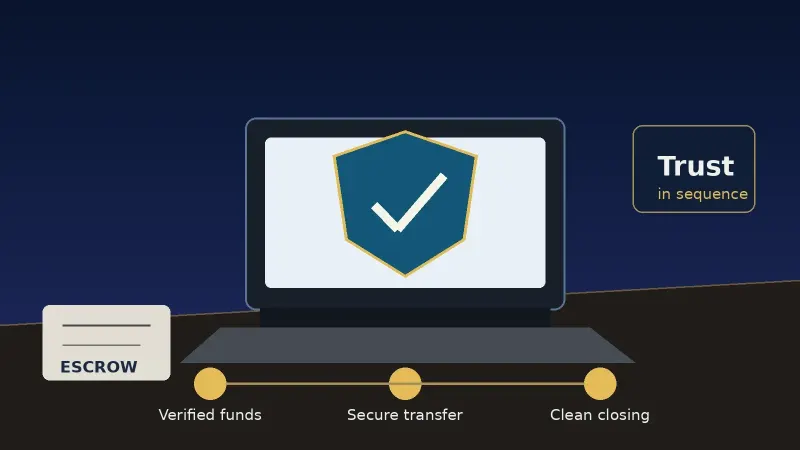
Buyer wiring funds to a trusted third party. That provider verifies the payment, then instructs the seller to release the domain. Once the buyer verifies they received control of the asset, the provider disburses funds to the seller.
This isn’t about trusting strangers to act in good faith. High value domain sales finalize because there is a documented process that forces payment verification and asset delivery to happen in the right order.
The Buyer/Seller Trust Gap: Transferring Domains Directly
Domains are digital property.
They don’t come in a box. There is no handshake. Your ownership is shown through registry entries, registrar controls, codes, NS records, and account permissions. You can move a high value domain between accounts or registrars without ever meeting the other party face to face.
While that’s convenient, it also creates inherent fears.
Buyers don’t want to send money and never see the domain. Sellers don’t want to hand over control and get scammed by delayed payments, chargebacks, or false confirmations.
Sending a bank wire doesn’t fix either issue. Escrow.com highlights how sending a wire only transfers funds. An email invoice doesn’t verify that the domain moved successfully either.
A formal escrow process bridges both sides of the transaction.
“To ensure the buyer is protected,” says Escrow.com, “seller won’t hand over domain until funds are secured.”
Three Ways to Prevent Fraud When Buying Premium Domains
Rules are simple.
Rule 1: Don’t unlock the domain until you get verified funding. Make sure to type escrow.com into your browser rather than clicking an emailed link. Phony emails can replicate transfer notices, payment confirmations, registrar emails, or fake instructions.
Rule 2: Don’t release control of the domain too early.
ICANN details that transfer lock may show as clientTransferProhibited or something similar. This lock setting helps prevent unauthorized transfers. The seller should never remove this lock until the domain is ready to be transferred using the secured instructions.
Rule 3: Don’t release the Auth Code until you are sure the buyer is ready.
ICANN clarifies that moving a domain to a new registrar requires the current domain seller to provide an Auth Code. This code allows the buyer to take control of the domain. The seller generates the code through their registrar and provides it to the buyer through the agreed domain transfer process.
If you receive an invoice to send an Auth Code via email, don’t do it. Your transaction provider may support this workflow if both parties understand the risks. Emailing the Auth Code to your buyer is only safe when your escrow provider specifically instructs you to use that method.
What Happens During an Escrow Closing? Step by Step
Let’s break down a standard closing into five steps.
Step 1: Agree on the Terms.
Buyer and seller agree to transfer terms including price, inspection period, payment method, who pays fees, and whether the domain transfers internally or via Auth Code.
Both parties should agree on a transfer route BEFORE the seller provides access information.
If using an account push (moving the domain to a second account at the existing registrar), verify all of the below while the domain is still inside the seller’s account.
|
No. |
Pre transfer item |
|
1. |
Confirm the current registrar. |
|
2. |
Check when the domain expires. |
|
3. |
Verify the transfer lock status. |
|
4. |
Check when the domain last changed registrants. |
|
5. |
Confirm if DNSSEC is active. |
|
6. |
Confirm if the domain is disputed. |
|
7. |
Record nameservers. |
|
8. |
Determine whether the domain will be pushed to the buyer’s account or require an inter registrar transfer. |
Account pushes can be risky if the domain was recently transferred or is temporarily ineligible for transfer. Domains may show as available to transfer – only to have the seller tell you it didn’t move hours or days later.
Step 2: The Buyer Sends Funds to Escrow.
Submit your payment method through your escrow account. Escrow.com specifically mentions that wire is available for any amount. For PCI compliant credit cards and PayPal, only transactions under $5,000 are eligible. Those methods are also subject to additional fraud analysis.
If you are the seller, do NOT trust a screenshot.
Escrow companies do not release seller instructions until funds have been verified. Both parties should be patient. Don’t take unnecessary risks just to close faster.
Step 3: The Seller Sends the Domain to Buyer.
Once verified, the seller initiates the transfer process.
If the domain moves through an account push, the seller follows their registrar instructions to move the domain to a second account.
If the domain transfers between registrars, most sellers will unlock the domain then generate the Auth Code. ICANN mentions that domain sellers can either create the Auth Code inside their registrar control panel OR the registrar must provide the Auth Code within five calendar days of request.
Don’t rush this step. Double-check everything before releasing the domain. Portfolio sellers who manage multiple domain names should be especially careful to verify the spelling, extension, and buyer account details are correct. There is typically only one chance to get a transfer right.
Step 4: The Buyer Inspects the Domain.
“The buyer,” says Escrow.com, “inspects the domain name and decides whether to accept it.”
Review the following BEFORE accepting the domain.
|
No. |
Buyer inspection item |
|
1. |
Confirm you received control of the domain (account or DNS.) |
|
2. |
Check the spelling. |
|
3. |
Check the domain extension. |
|
4. |
Confirm you received account access. |
|
5. |
Double-check the expiration date. |
|
6. |
Verify transfer status. |
|
7. |
Review nameservers. |
|
8. |
Review DNS records. |
|
9. |
Check DNSSEC. |
|
10. |
Review domain locks. |
Escrow.com confirms buyers can specify an inspection period anywhere from one day to thirty calendar days. This period should be agreed upon by both parties PRIOR to starting the transaction.
Some domain sales are simple. Others may require additional time to migrate a website, DNS records, or unlock technical dependencies. Larger portfolio acquisitions should schedule more time just in case.
Step 5: Seller Receives Funds.
After inspection is complete, and the buyer accepts the domain, funds are disbursed to the seller.
Escrow.com says “SELLERS GET PAID” as soon as Escrow.com receives notice that the buyer has accepted the domain and inspection period is complete.
Review payout instructions to avoid surprises. International wires take longer than domestic wires.
Don’t finalize
a domain transfer until you verify control.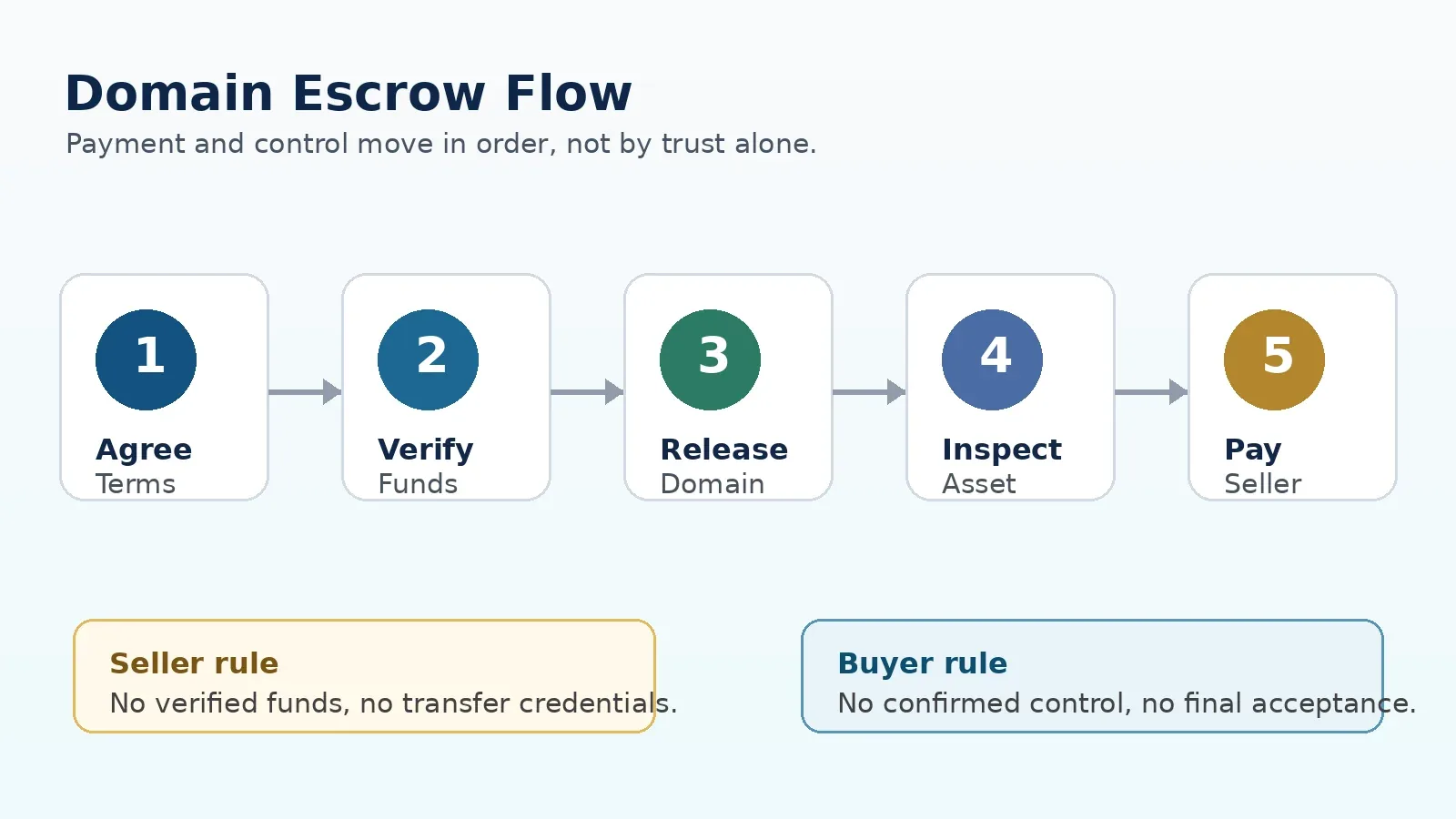
How Long Should You Expect the Escrow Process To Take?
Timelines vary greatly.
Escrow.com explains that transactions take one to twenty business days. Actual time will depend on payment method, verification process, transfer method, registrar workflow, inspection period, and how quickly each party responds.
Account pushes can be instantaneous if everything is ready.
International transactions can take weeks. Verifying the buyer’s identity, payment tracing, bank processing, and working with your registrar can create unexpected delays.
ICANN mentions that domains with a transfer lock, registered within last 60 days, transferred within last 60 days, or changed registrant within last 60 days may be ineligible for transfer. If a domain is ineligible for transfer when you unlock, work with your registrar to determine when you can safely transfer.
Don’t tell your buyer your every transaction will finalize within 24 hours.
That promise is unrealistic.
Instead, create a realistic plan with deadlines.
|
Key Stage |
Factors that Influence Timing |
|
Agreeing |
on Terms Seller/Buyer Response Time |
|
Funding |
Wire Speed and Escrow Verification Process |
|
Transfer Instructions |
Registrar Workflow and whether domain is locked for transfer |
|
Transfer Delivery |
Time to process push vs. registrar transfer. |
|
Inspection |
Length of Inspection Period |
|
Payout |
Type of Payout Method |
Closing a Domain Sale With Escrow.com vs a Brokerage
Domain escrow providers and brokerage checkout processors solve similar problems for buyers and sellers. But they are not the same thing.
Escrow.com specifically mentions they are a licensed escrow company. When you use Escrow.com, your funds are kept in trust until both parties meet the terms of the agreement.
Escrow.com is a great choice for private sales. Some brokers offer escrow services as part of their sales platform. Other transactions may occur where both parties specifically choose a third party escrow provider rather than trust a brokerage to mediate the process.
Brokerage systems make sense when a domain is already for sale on a secure platform. Buyers and sellers already agree to use that system when creating an account.
Atom provides secure payment and transactions for domain buyers and sellers. Atoms’s buyer guide mentions their checkout service protects buyers funds until the domain transfers. Domains purchased inside an Atom serviced marketplace typically move to Atom Registrar. This process allows the use of standardized anti-fraud timeouts and a predictable transfer process.
Atom specifies their website by saying “AtomPay is not a licensed escrow company or fiduciary.” When signing up for a new account, take the time to review the Rules of Usage. Assume Terms change frequently. Just because you used an escrow service before doesn’t mean the service works the same way when you return.
Understanding which solution is best depends on the situation.
|
Transaction |
Suggested Solution |
|
Buyer and seller negotiate directly |
Standard escrow provider is recommended. |
|
Transaction handled by a broker |
Broker may offer escrow services. Use them or choose your own. |
|
Domain sale on a secure website |
Use provided checkout service. |
|
Seller accepts payment plans |
Payment processor that supports installment payments and documented custody agreements. |
|
High risk sale that requires a legal review |
Have an attorney review terms THEN select a controlled escrow service. |
|
Account push whenever possible. |
If both parties agree, moving domains between accounts is easiest. |
Don’t decide how to transfer until after terms are agreed.
What About Lease to Own Domains or Installment Payments?
Domain escrow doesn’t always mean immediate transfers.
Lease to own agreements allow the buyer to “own” the domain before paying full price. This methodology helps sellers reach more buyers and charge a higher price. Buyers like leasing domains because they don’t need approval to finance the purchase.
Escrow.com points out their normal escrow service isn’t designed for domains on installment plans. Instead, they offer Domain Name Holding Service agreements.
The Escrow.com holding service secures the down payment, takes control of the domain, holds the domain for X amount of time while scheduled payments are collected, then releases control of the domain to the buyer when the agreed payments are complete.
Escrow.com mentions domains can be leased for monthly, quarterly, or annual payments. Their documentation mentions lease terms can last from three months to five years.
Instead of trusting the buyer to pay, the seller trusts Escrow.com to collect payments and release control of the domain ONLY when the agreed upon payments are complete.
Milestone transactions create a customized payment schedule.
Domains may be sold on installment plans that allow DNS access, fraud protection, and more. Both parties should agree on payment deadlines, who controls DNS, who is responsible for renewals, what happens if the buyer defaults, how to pay-off remaining payments, and who loses the domain if the buyer misses a payment.
Domain Transfer Best Practice Checklist
Before buyer submits payment to escrow.
|
No. |
Before buyer submits payment to escrow |
|
1. |
Confirm the agreed upon domain name. |
|
2. |
Type escrow.com into your browser to confirm you are on the real website. |
|
3. |
Write down the domain’s expiration date and registrar. |
|
4. |
Check the domain is locked for transfer. |
|
5. |
Confirm the domain will be pushed or sold using an inter registrar transfer. |
|
6. |
Agree on the inspection period. |
|
7. |
Confirm who is responsible for the escrow fee. |
Once Escrow Provider Verifies Funds:
|
No. |
Once escrow provider verifies funds |
|
1. |
Login to your domain account directly. |
|
2. |
Unlock the domain ONLY when you are sure it’s time to transfer. |
|
3. |
Generate the Auth Code for ONLY the domain you are about to sell. |
|
4. |
Use ONLY the secure transfer route discussed with the buyer. |
|
5. |
Print or screenshot transfer confirmation email. |
|
6. |
Send updates to your transaction provider if something goes wrong. |
After Buyer Claims Domain:
|
No. |
After buyer claims domain |
|
1. |
Verify you control the domain (account access or DNS.) |
|
2. |
Review nameservers and DNS records. |
|
3. |
Double-check domain renewal settings. |
|
4. |
Reapply domain locks. |
|
5. |
Review DNSSEC settings before making changes. |
|
6. |
Log into escrow.com and confirm the transaction is complete. |
|
7. |
Print and store all transaction documents safely. |
Conclusion: Escrow Sales are Repeatable Steps
Escrow closes once verifiable steps are completed.
Never give escrow money until you are certain the process is legitimate. Domain sellers should not provide transfer credentials until escrow confirms funds.
Take time to understand who will control the domain at every step prior to agreeing on price. Make a list of what happens at each stage BEFORE giving escrow money or handing over control of a domain.
Here’s how a typical domain escrow transaction closes.
Agreement -> Verified Funding -> Release Domain -> Buyer Inspects -> Seller Gets Paid
Write it out. Print it. Hang it inside your office.
When tempted to rush a domain escrow sale, revisit this process. Both sides should follow the steps.
Escrow ensures the buyer doesn’t lose money. Escrow ensures sellers are paid once terms are met. Domain escrow is simple because both sides know what happens at every stage of the sale.