When looking at a domain name you can be forgiven for thinking it’s not very important. After all, it’s only a few letters followed by a dot and an extension. However, that small piece of digital real estate controls much more than just a web address.
Domains decide where customer traffic should go, which servers accept company emails, how people access a hosted account portal, and if other services can trust your business identity. Your ecommerce store, software platform, or professional-services website relies on your domain as part of your operating infrastructure.
The full impact may not be obvious until a domain is hijacked. An attacker doesn’t necessarily have to compromise the website server itself to cause problems. Gain access to the registrar account or authoritative DNS settings and the original website can stay untouched while visitors are redirected without their knowledge. Email could be redirected to another mail server. Password-reset links could be intercepted. A fake replica of the company website could appear at the real domain name. In some situations DNS changes can allow the attacker to generate a valid TLS certificate for the compromised infrastructure.
Domain Privacy vs Domain Security
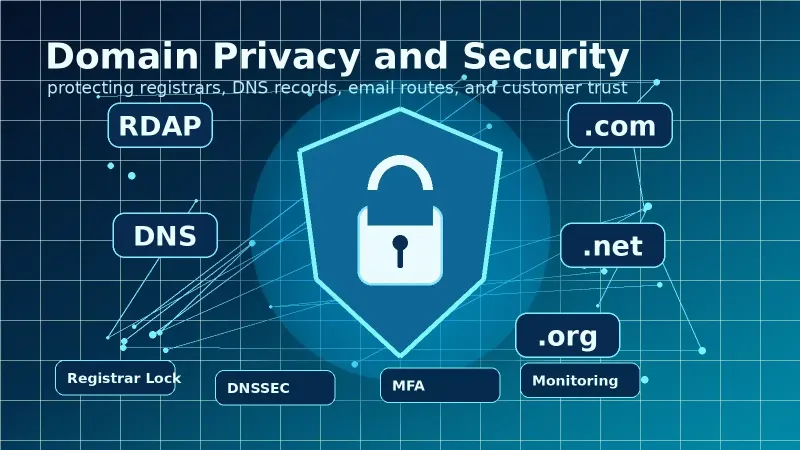
Domain privacy and domain security sound similar, but they each protect against different types of threats. Domain privacy reduces how much personal or business contact data is visible through public WHOIS (and now RDAP) services. Domain security focuses on keeping the domain itself from being transferred, altered, deleted, expired, or otherwise taken over by unauthorized users.
Keeping your phone number hidden from public view is a good idea. But that will not stop an attacker who has already obtained the password to your registrar account.
Rather than
relying on a single solution, registrants should use several layers of defense.
Protect exposed contact information. Secure the registrar account itself. Lock
down the domain to prevent unauthorized transfers and changes that could cause
significant business impact. Protect DNS records and respond to changes.
Continuously monitor domains so suspicious changes are caught before customers
start complaining.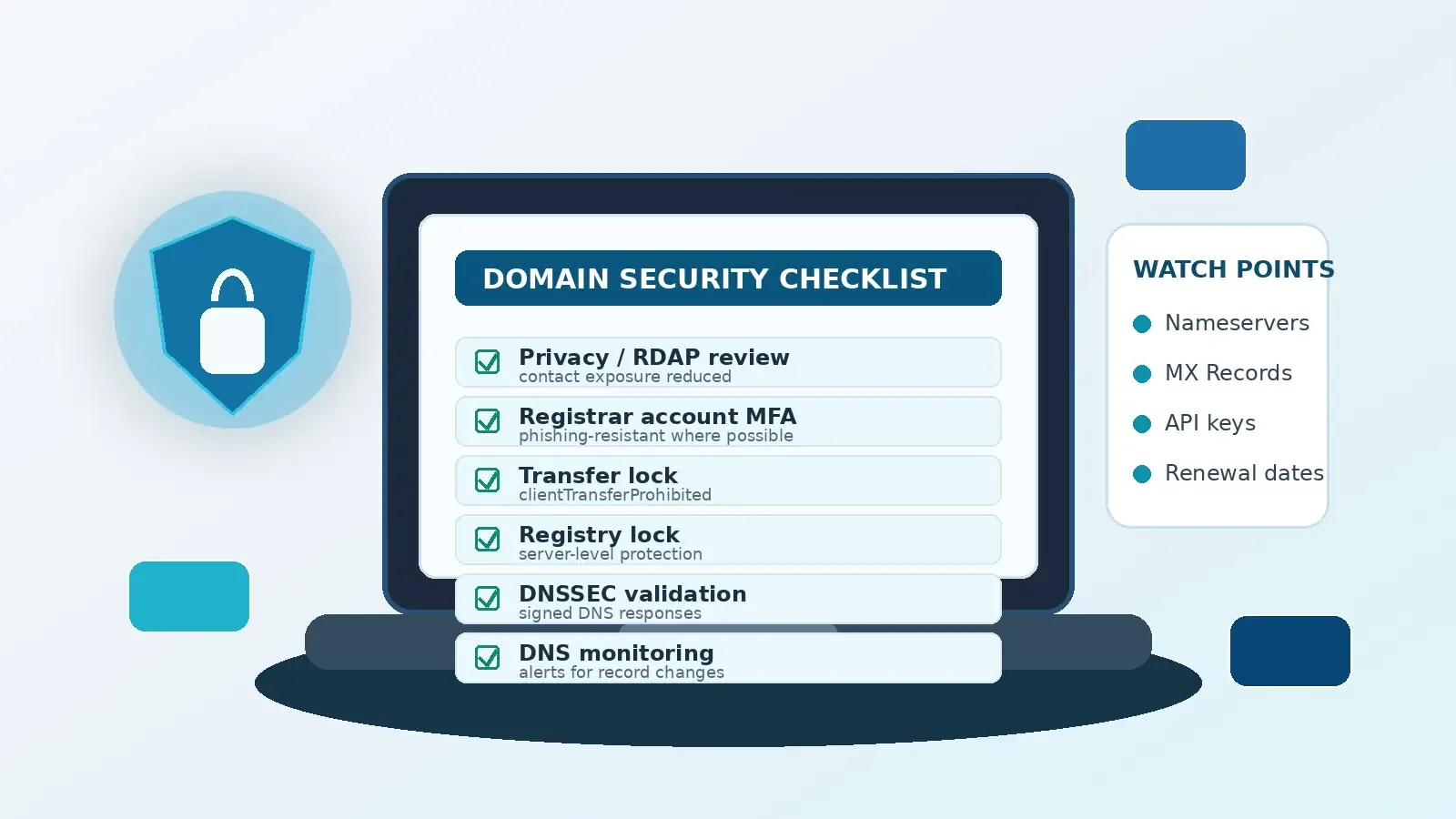
THE IMPORTANCE OF THE DOMAIN NAME SYSTEM
To understand why a domain is important remember how websites and other services rely on DNS. The Domain Name System translates human-friendly domain names into the technical information required by internet services.
When someone visits a domain in a web browser DNS instructs the browser which server is hosting the website. If someone tries to send an email to that domain, DNS identifies the correct destination through MX records. Other records like TXT may contain email authentication rules or verification values used by other services.
Because of this, domains are practically a trusted anchor for online identity. Internet users see one familiar name, but the DNS records associated with that name control multiple services at once.
DNS records may direct website traffic through A, AAAA, or CNAME records. Domains may direct email through MX records. NS records may delegate control of subdomains to other nameservers. SPF, DKIM, and DMARC related records help authorize specific mail senders. Developers could point logins, APIs, customer support portals, documentation websites, status pages, or internal services at any of those records.
A successful domain hijack can impact more than just the website itself. DNS changes could redirect users while the actual web server continues to operate normally. Password-reset emails could be redirected to spoof customer support. Hosting provider DNS changes could send customers to a look-alike website hosted by the attacker.
This isn’t speculation — Mandiant published an analysis of a global DNS hijacking campaign in January 2019. Several large scale campaigns abused DNS-record management to redirect traffic and compromise victims. The report highlighted the importance of treating domain management as security infrastructure instead of a passive service that’s only checked every time a domain expires.
WHOIS PRIVACY VS RDAP PRIVACY
Domain registrations include contact data. That may be a name, organization, address, phone number, and/or email address. Registrars still need access to accurate contact information when performing updates or communicating with the registrant. Domain privacy doesn’t mean registering a domain under false information.
Instead, registrants used to search for registration details using WHOIS. Earlier versions of the WHOIS protocol allowed anyone to query details about a domain. Unfortunately, results were inconsistent between different providers. Contact information was also publicly accessible which lead to several familiar privacy issues.
Anyone could submit a WHOIS query and find a person’s email address. Some people even used their home address as the registrant information. Companies had the problem of exposed admin contacts effectively giving attackers clear instructions on who to impersonate.
RDAP is the New WHOIS
Today’s model is slightly different. Starting January 28, 20
25, RDAP became the standard method to retrieve publicly available registration data for generic top-level domains. RDAP replaces legacy WHOIS for that purpose.
The modern system uses structured data with access over HTTPS. Domain discovery and lookup is standardized. RDAP support internationalized domains and offers several ways to limit access to registration details.
WHAT IF I DON’T USE WHOIS PRIVACY?
Contact exposure can lead to a number of problems. Businesses and organizations often face different risks than someone using a personal email address and home phone number as registrar contact details.
The wrong assumption is that registration data isn’t sensitive because it doesn’t include a password. Attackers don’t always start with a VPN brute-force attack or stolen RDP credentials.
Information gathering often starts with publicly available data. An exposed admin email address identifies who to impersonate when calling in support requests. A phone number could be used during a social-engineering call to gain confidence. Physical addresses could be used to answer security questions or as part of a targeted spear-phishing attack.
Visible registration data might not give an attacker access, but it does make social engineering attacks more convincing. It also opens your inbox to extra spam.
Even when registration data isn’t weaponized, having your contact details publicly accessible invites unsolicited marketing messages. Domain owners are regularly sent fake renewal notices, search engine marketing proposals, fake trademark claims, and invoices for bogus support services.
Clicking those links is never a good idea, but some attack attempts are sophisticated enough to try and force a sense of urgency. The recipient may be told they’ll lose their domain or website unless they act immediately.
When asked “What happens if you don’t use WHOIS privacy?” the most accurate answer is not “my domain will get hijacked.” Instead, public registration data lets anyone browse your contact details even when they have no legitimate reason to know that information. It adds risk without giving you more control as the domain owner.
Use WHOIS Privacy When Available
Masking personal contact information is one reasonable solution whenever the domain extension and registrar support it. While a business domain should still use role-specific emails like domains@example.com, WHOIS privacy can reduce exposure against socially engineered attacks.
A targeted attacker will find a way around privacy protection eventually. But registrants shouldn’t reward nuisance marketers by making their contact info freely accessible.
DOMAIN PRIVACY ≠ DOMAIN SECURITY
Domain privacy does help limit exposure. But privacy itself cannot prevent every attack vector.
An attacker can still hijack a domain that’s been redacted from WHOIS search tools. DNS records could be modified by someone who reuses their domain-login password across unrelated sites. Business email compromises can circumvent privacy protections by targeting mail servers directly.
Domain Security Layers
Divide up the security steps to make things easier to manage:
* Registration-data privacy: Prevents unnecessary public exposure.
* Registrar account security: Prevents unauthorized access to domain settings.
* Domain locks: Helps prevent unauthorized modifications.
* DNS security: Protect DNS record integrity and guard against forged DNS responses.
* Monitoring and recovery: Provides visibility into unexpected changes.
WHO DO HACKERS PHISH TO HACK YOUR DOMAIN?
It can feel odd to think about domain security in the context of phishing. After all, domain hijacking doesn’t directly involve tricking someone into giving up their password.
But phishing may be initiated before the attack ever reaches your registrar account. Take a look at some methods used in previous domain compromises.
An unauthorized transfer marks the most recognizable example of domain hijacking. In this scenario, someone makes the domain point to a new registrar or account. After the transfer propagates through ICANN’s system, the original registrant may find it difficult to reverse the changes. Attackers can point nameservers elsewhere, renewals could be cancelled, or hijackers may try selling the domain to a third party.
A subtler attack might not change the registrar at all. Instead, the attacker could log into the registrar account and modify the domain nameservers. Immediately after that change, the attacker now controls the authoritative DNS responses. Visitors will be sent elsewhere while email could be routed to a mail server chosen by the attacker.
DNS Providers could also be targeted independently from the registrar. It’s common for businesses to separate domain registrations from DNS hosting. This can provide redundancy, but both account need to be kept secure. Attackers who gain access to the DNS hosting account can modify records without touching the registration itself.
Registrars themselves can also be phished. The password-reset destination for most registrar logins goes somewhere. If the connected mailbox has poor security, an attacker may compromise the registrar through that vector alone. A strong domain password is pointless if the email account linked to password recovery is weak.
Expiration is a different type of domain security failure. While phishing is still a common tool, an expired domain could be left unused until it expires. Other causes include expired payment cards, outdated inbox forwarding, or staff turnover. Internal errors should be considered during risk assessments, but poorly maintained domains are also attractive to malicious actors.
PHISHING YOUR WAY TO THE REGISTRAR ACCOUNT
Taking control of the registrar account is often the first goal. Use a unique password stored in a password manager as the first step. Password reuse takes a domain-security problem and turns it into an unrelated data breach.
Enable multi-factor authentication as soon as possible. While better than no protection, SMS-based verification codes are weak protection for a domain. SMS messages can be intercepted by SIM swap scams, abused during account recovery, or through social engineering attacks against mobile providers.
Authentication apps provide better security than text messages. Attackers can still phish websites that capture an active login session and transmit two-factor codes in real time.
For high value domains consider phishing-resistant security wherever it’s available. The Cybersecurity & Infrastructure Security Agency has a list of various authentication methods and their relative strengths. As of this writing, CISA states FIDO/ WebAuthn provides phishing-resistant authentication.
Account recovery methods should receive the same scrutiny as account login processes. Who has access to the password reset email inbox? How can that inbox be recovered if the account credentials are lost? A weak recovery process can negate a strong login process.
Domain Management APIs should be treated like critical software secrets. Several registrars and DNS providers offer programmatic access to domains and DNS records through developer APIs. Restrict API access to systems that require it. Limit permissions as much as possible. Use IP allowlists when supported. Rotate credentials regularly and store them in a secrets manager. Never leave API keys inside a plaintext document or public code repository.
DOMAIN LOCK IS THE NEW LOCKED MODE
Domain registrars should enable domain locking whenever possible. The setting may be listed as “domain lock”, “transfer lock” or something similar in the account dashboard.
Underneath, the EPP status is commonly clientTransferProhibited. This key informs the registry that requests to transfer the domain from the current registrar should be rejected. It prevents fraudsters and hijackers from performing unauthorized transfers.
One confusing part of the technical model is the use of client. The term does not imply that an end-user visiting the website can modify that setting. When registrars apply clientTransferProhibited status, they communicate that information to the registry via Extensible Provisioning Protocol (EPP).
Registrars who support granular locking may also expose methods to protect domains from unintended updates or even deletion. Statuses include clientUpdateProhibited and clientDeleteProhibited.
When should a business consider going further than domain locking? High-value domains.
Domain REGISTRY LOCK
Smaller websites and developmental projects can get away with less stringent protections. A business relying on their domain for website and email operations should consider stronger protection: Registry Lock.
Registry Lock is similar to domain lock, but it prevents changes at the registry level as well as the registrar dashboard. VeriSign describes registry lock service for .com domains as:
“The Registry Lock Service helps prevent unauthorized domain transfers by placing server- level locking controls on your domain.”
These controls include serverTransferProhibited, serverUpdateProhibited, and serverDeleteProhibited.
While the domain is still unlocked in the registrar, both the registrar and registry must cooperate to make changes when Registry Lock is enabled. Automated transfers or unauthorized changes become substantially more difficult.
The 3 server prefixes cover common types of modifications:
* serverTransferProhibited: Blocks transfers to another registrar
* serverUpdateProhibited: Prevents updates to DNS records, including delegation to other nameservers.
* serverDeleteProhibited: Prevents domain deletion
Weakest Link Security
Registry Lock isn’t always possible or practical. Registering a new domain requires you to unlock it before the transfer can begin. Registry Lock creates extra steps in the workflow.
If a registrar account is compromised, Registry Lock does little to prevent an attacker from making immediate changes through the website dashboard. Registrar lock helps prevent casual transfers. It won’t make compromises impossible.
If you run a business website, email, or store customer data you should consider enabling Registry Lock.
Does your Registrar Support Registry LOCK?
Support and process will vary depending on the extension and registrar. Ask your registrar directly if Registry Lock is available for your domain.
DOMAIN TRANSFER: How To Unlock Your Domain
You should keep your domains locked at all times. Unlock the domain only if you’re about to transfer it to another registrar.
Steps
This is a general guide for unlocking a domain. Interfaces vary so button labels will not always match.
STEP 1: Confirm the transfer is legitimate
Do not unlock a domain because someone sends you a chat message asking for it. Someone may pretend to be a registrar, broker, or hosting provider in an attempt to trick you. Link the domain unlock process to a documented change that you approved.
STEP 2: Check if the domain is eligible for transfer
Recent registrations, transfers, or changes to registrant information can impact eligibility. Review the policies at the top of the registrar dashboard first. Avoid changing contact details immediately before initiating a transfer.
STEP 3: Make sure important emails will be delivered
Can someone reach the registrant or admin email address? Transfer confirmation messages will be sent to that inbox. Failure to see those emails can complicate the process or allow a fraudulent request to slip through undetected.
STEP 4: Document current DNS records
Export or screenshot the current nameservers and any critical DNS records. Transfers do not automatically transfer DNS records. Having a record of what changes later will help you spot accidental modifications.
STEP 5: Disable domain lock temporarily
Remove the lock when you’re ready to start the transfer process at the new registrar. The associated EPP status is clientTransferProhibited.
STEP 6: Obtain the auth-code through a secure channel
This sensitive. An Auth-Code, EPP code, or transfer authorization code should never be shared through an unencrypted chat message or stored in a public document. An authenticator tied to the old account can also be used to take control of the domain if precautions are not taken.
STEP 7: Initiate the transfer with the new registrar
Only enter the domain and authorization code on the official website of the receiving registrar. Double-check the URL in the browser. If someone sent you an email asking to initiate a transfer, do not click that link. Go directly to the registrar’s login page.
STEP 8: Read each notice carefully before confirming
Constantly approve confirmations without reading. Verify the domain name, destination registrar, and date before approving the transfer. Phishing scams can resemble legitimate transfer emails closely.
STEP 9: Verify the transfer has completed
Finally, confirm the domain has been transferred by reviewing key settings. DNS records, nameservers, renewal date, whois privacy, and contact settings should match your expectations. Look up the domain through RDAP and confirm that the current registrar and status is showing correctly.
STEP 10: Lock your domain again
Re-enable protection as soon as the transfer completes. Re-enable two-factor authentication, check that auto-renewal is enabled, and confirm privacy protection is active. Consider restoring Registry Lock through your registrar if you enabled it previously.
Takeaway: When planning a legitimate transfer, treat the unlock process as you would any other temporary security exception. The window of time where the domain is unlocked should be kept as short as possible.
Why Nameserver Changes Can Be Sneakier Than Transfers
Domain transfers are scary, but nameserver changes can be worse. Users may not realize something is wrong until it’s too late.
Nameservers record which servers are responsible for DNS lookups related to the domain. Changing nameservers to a DNS hosting company controlled by an attacker allows the attacker to publish fraudulent DNS records.
Website traffic could be redirected to another server. Incoming email could start routing through newly altered MX records. SPF settings could be modified to allow anyone to send email as that domain.
The domain would still show as registered to your business during the attack. Someone could check the registrar and see the domain is active and owned by you. Unless someone compares the current nameservers and DNS records against a known good set, visitors may never notice they’ve been redirected.
Domain names belonging to important business functions should be protected from unauthorized updates as well as unauthorized transfers. Domain locks that prevent only registrar transfers do not necessarily stop DNS changes if someone gains access to your registrar account. ServerUpdateProhibited from the registry can help prevent unauthorized nameserver re-delegation.
Maintaining DNSSEC
DNS was never designed to cryptographically validate responses. Without DNSSEC, a resolver had no built-in way to know whether the DNS response it received was accurate and intact.
DNSSEC adds cryptographic signatures to DNS data. When properly configured, DNSSEC protects against receiving tampered DNS responses from a signed zone.
DNSSEC does not solve every DNS-related security problem. However, it does protect against forged or poisoned DNS responses when DNSSEC is enabled correctly.
DNSSEC depends on a chain of trust. When DNSSEC validations are enabled, the root zone tells resolvers it trusts your domain’s TLD extension. That extension publishes a DS record for your domain. Your domain’s DNS service then publishes DNS records with cryptographic signatures.
All of those signatures link together to create a trust relationship. Validating resolvers can then use DNSSEC signatures to verify responses are valid and matches what the zone published.
While DNSSEC protects response integrity, it does not:
* Encrypt DNS traffic
* Conceal which domain a user is requesting
* Prevent someone who has legitimate access to your DNS account from making authorized changes
* Fix weak passwords used with your registrar account
Enable DNSSEC with caution. DNS providers and domain registrars that don’t support it will cause problems. Once DNSSEC is activated, perform validation tests to confirm the signed zone resolves correctly for users that perform DNSSEC validations.
Put DNS Settings in Configuration Management
Some website owners edit DNS records only a few times each year. When changes are monitored and limited to authorized people, this can be acceptable.
Businesses with mission critical systems should treat DNS changes as code.
Isolate administrator access so that no two users share the same password. Review account permissions periodically and revoke access to contractors when a project is complete. Maintain separate login credentials between employees, third-party vendors, and hosting providers.
DNS records should be placed under version control. Code review can be expanded to cover DNS changes as well. DNS history shows who changed a record, what was changed, and when it was changed.
At a minimum, document the expected state of your DNS zone. This includes:
* Authoritative nameservers
* Records related to the website
* Mail records (MX, SPF, DKIM, DMARC)
* Important subdomains
* Domain verification records
* DNSSEC publication status
Changing TTL Values
Timeouts are something else to keep in mind. TTL values dictate how long clients should cache DNS responses.
A short TTL ensures users see your changes quickly. But if everyone is forced to refresh cache every hour, that creates extra load on your DNS infrastructure.
Long TTL values can make it difficult to recover from urgent changes. Everyone may still be serving cached responses from an hour ago while you’re troubleshooting DNS problems.
Keeping TTL values too short can be annoying. Understand your DNS records and adjust TTLs appropriately.
Tip: Include Domain Security in Your Email Security Strategy
Taking control of a domain name also lets hackers control your email systems. Exchange and Office 365 email relies on DNS just as your website does.
Incoming mail is routed through MX records. Some prevention measures like SPF and DKIM publish specific records in DNS. DMARC policies tell receivers how to handle certain failures and where to send reports.
Changing MX records could allow an attacker to intercept incoming mail. Making changes to TXT records could weaken your email authentication settings or cause unexpected results.
The registrar account recovery email also demands special consideration. If the connected email inbox is abandoned or rarely checked, passwords resets will be delayed or missed entirely.
Try to avoid circular dependencies. If the registrar account for example.com can only be recovered through admin@example.com, then losing access to that mail box leaves you with limited recovery options. Some organizations use a tightly secured external email address just to avoid this scenario.
DOMAIN REGISTRARS WHO OFFER WHOIS PRIVACY FOR FREE
The cheapest domain registrar isn’t always the best option. Factors to consider include:
* Renewal pricing
* Supported extensions
* Eligibility for privacy services
* Account-security features
* Transfer protections
* DNSSEC support
* Account recovery procedures
* Customer support responsiveness
* Availability of registry lock for high-value domains.
The following registrars offer WHOIS privacy for free on eligible domains at the time of this writing.
Namecheap offers Domain Privacy service for free of charge on all new registrations and transfers.
Cloudflare Registrar offers whois privacy by default and charges only for the cost to register the domain with no markup.
GoDaddy includes free privacy protection on new domain registrations that are eligible for privacy.
SUMMARY: How To Keep Your Domains Secure
The best security plans can be reused. Create a security checklist for domains instead of just setting things up once.
Begin with the registrar account:
* Use a strong password stored in a password manager.
* Enable two-factor authentication. If your registrar supports FIDO/WebAuthn move to a phishing-resistant option as soon as possible.
* Review account recovery methods. Remove any unused email addresses or phone numbers.
Then complete the following tasks for each domain you own:
* Turn on privacy when the registrar supports it.
* Look up the public registration data with RDAP and review the output. Personal names, direct email addresses, phone numbers, and home addresses should not be public.
* Enable registrar lock and confirm that transfer prohibitions are in effect.
* Determine if high-value domains require Registry Lock.
Next, secure your DNS provider account separately from the registrar:
* Use a strong unique password.
* Enable MFA for your DNS provider account.
* Reduce the number of administrators.
* Restrict API access and monitor those credentials.
* Document your DNS configuration. Export and review DNS records including NS, MX, A, AAAA, CNAME and TXT records.
* Enable DNSSEC if your registrar supports it and your IT team knows how to monitor DNSSEC alerts.
DNS Automation and Monitoring
If you’re automating DNS then treat records like application configuration. Retrieve existing DNS records before making changes. Code reviews help limit mistakes by introducing oversight before pushing changes to production DNS servers.
Follow DNS best practices by reviewing changes to DNS records before they are deployed. Infrastructure-as-code services allow you to document modifications as part of your development pipeline. Teams can refer back to internal records to verify that a change was authorized.
Consider turning on auto-renewal and keeping the payment method up-to-date. Attempt to renew critical domains weeks or months in advance. Don’t rely on a last-minute email reminder to renew domains.
Monitor DNS changes and login activity. Setup alerts when someone modifies nameservers, updates DNS records, removes the transfer lock, or logs into the registrar account. Make sure contact details are still accurate. Domains should be reviewed at least quarterly or when employee changes are made to the team.
Tips for Maintaining Domain Security
Domain registrations expire. Staff members come and go. Contractors may leave behind access they were entrusted months or years ago. DNS providers may update their infrastructure and migrate account data.
New subdomains are added. Old development emails are forgotten. Contact details change. Staying on top of domain security is an ongoing process but applying several layers of defense will greatly reduce risk.
Encrypt personal contact data with domain privacy when possible. Secure registrar accounts with unique passwords and phishing-resistant authentication. Maintain domain locks and use registry lock when appropriate. Keep DNS records secure. Setup DNS monitoring and DNSSEC. Document internal processes for recovering domains.
After all, your domain name is often one of the shortest values in your technical stack. But it also has the unique ability to impact your website, email service, customer trust, and brand recognition at the same time. Treat it like you mean business